> ## Documentation Index
> Fetch the complete documentation index at: https://docs.soo.network/llms.txt
> Use this file to discover all available pages before exploring further.

# Apro Oracle Guide

## About APRO

<Note>
  APRO has chosen SOON as their first SVM (Solana Virtual Machine) chain to support oracle services, marking a significant milestone in expanding their cross-chain oracle capabilities.
</Note>

### Overview

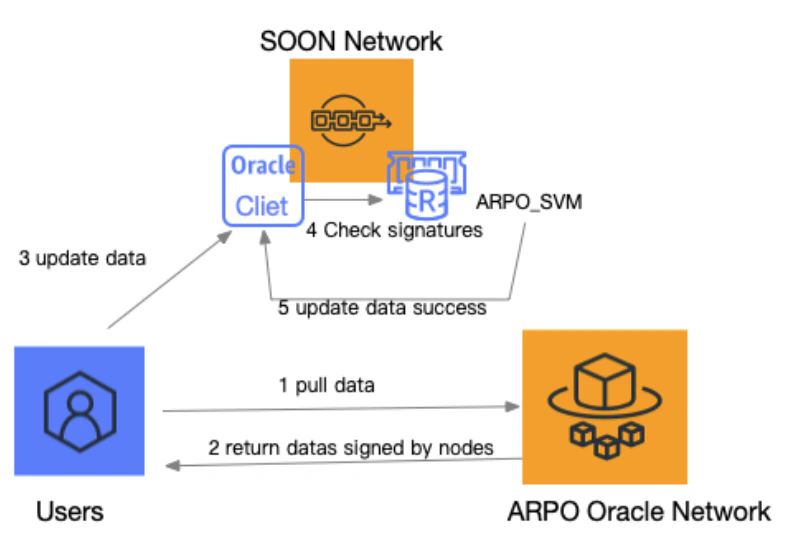
APRO is building a secure platform by combining **off-chain processing** with **on-chain verification**, extending both data access and computational capabilities. This forms the foundation of **APRO Data Service**, improving data accuracy and efficiency while offering the flexibility to create custom solutions tailored to the specific needs of DApp businesses.

<Frame>
  <img className="block rounded-md" src="https://mintcdn.com/soonlabslimited/NLY9iL1MRVrIdiiG/images/apro.png?fit=max&auto=format&n=NLY9iL1MRVrIdiiG&q=85&s=e2717ef0142eba8b3ec2f2db7b014079" width="793" height="550" data-path="images/apro.png" />
</Frame>

APRO Data Service supports two data models—**Data Push** and **Data Pull**—that deliver real-time Price Feeds and other essential data services, ensuring comprehensive support for all DApp business scenarios. Currently, they support 161 Price Feed services across 15 major blockchain networks.

### Data Service Models

* **Data Push**: Uses a "Push-Based" data model where decentralized independent node operators continuously gather and push data updates to the blockchain when certain price thresholds or time intervals are met. This improves blockchain scalability and provides timely updates.

* **Data Pull**: Uses a "Pull-Based" data model to deliver real-time Price Feed services to dApps. Designed for on-demand access, high-frequency updates, low latency, and cost-effective integration, making it ideal for DeFi protocols and decentralized exchanges.

### Key Benefits

1. **Combined Off-Chain & On-Chain Architecture**

   * Integrates off-chain computing with on-chain verification

   * Extends computing capabilities while ensuring system security

2. **Customizable Computing Logic**

   * DApp businesses can implement custom computing logic

   * Secure business logic processing without compromising security

3. **Enhanced Security Features**

   * Hybrid node approach combining on-chain and off-chain resources

   * Multi-network communication scheme to prevent single-point failures

   * TVWAP price discovery mechanism for fair and accurate data

## Integration Guide

### Program IDs

<Note>
  These are the program IDs for APRO Oracle integration:
</Note>

<div className="not-prose">
  <table className="border-collapse w-full">
    <thead className="bg-gray-100">
      <tr>
        <th className="border border-gray-300 px-4 py-2 text-left">Description</th>
        <th className="border border-gray-300 px-4 py-2 text-left">Devnet</th>
        <th className="border border-gray-300 px-4 py-2 text-left">Testnet</th>
      </tr>
    </thead>

    <tbody>
      <tr>
        <td className="border border-gray-300 px-4 py-2">Apro\_SVM\_Oracle</td>
        <td className="border border-gray-300 px-4 py-2 font-mono text-sm">`4Mvy4RKRyJMf4PHavvGUuTj9agoddUZ9atQoFma1tyMY`</td>
        <td className="border border-gray-300 px-4 py-2">Coming soon</td>
      </tr>

      <tr>
        <td className="border border-gray-300 px-4 py-2">Sample\_Client</td>
        <td className="border border-gray-300 px-4 py-2 font-mono text-sm">`HUJ8ouH6fVonhF1hPV6ENoLid5nbHfyZSpvfujw6X6Hm`</td>
        <td className="border border-gray-300 px-4 py-2">Coming soon</td>
      </tr>
    </tbody>
  </table>
</div>

### Feed IDs

<Note>
  The following feed IDs are available on the apro testnet:
</Note>

<div className="not-prose">
  <table className="border-collapse w-full">
    <thead className="bg-gray-100">
      <tr>
        <th className="border border-gray-300 px-4 py-2 text-left">Name</th>
        <th className="border border-gray-300 px-4 py-2 text-left">Feed ID</th>
      </tr>
    </thead>

    <tbody>
      <tr>
        <td className="border border-gray-300 px-4 py-2 font-medium">BTC/USD</td>
        <td className="border border-gray-300 px-4 py-2 font-mono text-sm">`0x0003665949c883f9e0f6f002eac32e00bd59dfe6c34e92a91c37d6a8322d6489`</td>
      </tr>

      <tr>
        <td className="border border-gray-300 px-4 py-2 font-medium">ETH/USD</td>
        <td className="border border-gray-300 px-4 py-2 font-mono text-sm">`0x0003555ace6b39aae1b894097d0a9fc17f504c62fea598fa206cc6f5088e6e45`</td>
      </tr>

      <tr>
        <td className="border border-gray-300 px-4 py-2 font-medium">SOL/USD</td>
        <td className="border border-gray-300 px-4 py-2 font-mono text-sm">`0x000343ec7f6691d6bf679978bab5c093fa45ee74c0baac6cc75649dc59cc21d3`</td>
      </tr>

      <tr>
        <td className="border border-gray-300 px-4 py-2 font-medium">USDT/USD</td>
        <td className="border border-gray-300 px-4 py-2 font-mono text-sm">`0x00039a0c0be4e43cacda1599ac414205651f4a62b614b6be9e5318a182c33eb0`</td>
      </tr>

      <tr>
        <td className="border border-gray-300 px-4 py-2 font-medium">USDC/USD</td>
        <td className="border border-gray-300 px-4 py-2 font-mono text-sm">`0x00034b881a0c0fff844177f881a313ff894bfc6093d33b5514e34d7faa41b7ef`</td>
      </tr>
    </tbody>
  </table>
</div>

### Authentication

#### Headers

<Note>
  All routes require the following two headers for user authentication:
</Note>

<div className="not-prose">
  <table className="border-collapse w-full">
    <thead className="bg-gray-100">
      <tr>
        <th className="border border-gray-300 px-4 py-2 text-left">Header</th>
        <th className="border border-gray-300 px-4 py-2 text-left">Description</th>
      </tr>
    </thead>

    <tbody>
      <tr>
        <td className="border border-gray-300 px-4 py-2 font-mono text-sm">Authorization</td>
        <td className="border border-gray-300 px-4 py-2">The user's unique identifier, provided as a UUID (Universally Unique IDentifier).</td>
      </tr>

      <tr>
        <td className="border border-gray-300 px-4 py-2 font-mono text-sm">X-Authorization-Timestamp</td>
        <td className="border border-gray-300 px-4 py-2">The current timestamp, with precision up to milliseconds. The timestamp must closely synchronize with the server time, allowing a maximum discrepancy of 5 seconds (by default).</td>
      </tr>
    </tbody>
  </table>
</div>

### API endpoints

#### Return a single report at a given timestamp

**Endpoint**: `/api/soon/reports`

<div className="not-prose">
  <table className="border-collapse w-full">
    <thead className="bg-gray-100">
      <tr>
        <th className="border border-gray-300 px-4 py-2 text-left">Type</th>
        <th className="border border-gray-300 px-4 py-2 text-left">Description</th>
        <th className="border border-gray-300 px-4 py-2 text-left">Parameter(s)</th>
      </tr>
    </thead>

    <tbody>
      <tr>
        <td className="border border-gray-300 px-4 py-2">HTTP GET</td>
        <td className="border border-gray-300 px-4 py-2">Returns a single report for a given timestamp.</td>
        <td className="border border-gray-300 px-4 py-2">• feedID: A Data Streams feed ID<br />• timestamp: The Unix timestamp for the report</td>
      </tr>
    </tbody>
  </table>
</div>

**Sample request**:

```bash theme={"system"}
GET /api/soon/reports?feedID=<feedID>&timestamp=<timestamp>
```

**Sample response**:

```json theme={"system"}
{
  "report": {
    "configDigest": "00067f925361b2ab26a59cc1997a5c064b3eeb4c9c39262caaf616b42d1ad132",
    "epochAndRound": 41831448,
    "extraHash": "0000000000000000000000000000000000000000000000000000000000000000",
    "feedID": "0x0003665949c883f9e0f6f002eac32e00bd59dfe6c34e92a91c37d6a8322d6489",
    "validFromTimestamp": 1734670442,
    "observationsTimestamp": 1734670442,
    "nativeFee": "3592730136000",
    "tokenFee": "350000000000000000",
    "expireAt": 1734756842,
    "benchmarkPrice": "97418950700000000000000",
    "askPrice": "97420347300000000000000",
    "bidPrice": "97418471600000000000000",
    "signatures": [
      "7a13e631c86604b0a86ed4c0ab8b9333b8e1aa2a562130575410e8e4896eea5d7e51ea881c40aecc8111665170b5c5b1c7657fc0140abb59d0fc17a9bd71f2a6",
      "86dd69e9ca6f9a72ff523df29cbc47f88ffded4c75f762abf301477cb4b4b1892053121d0727732547b31d04816679320520a81e0d34488726f7ccf5a3f6e9b9"
    ],
    "recovery_ids": [1, 1]
  }
}
```

#### Return a single report with the latest timestamp

**Endpoint**: `/api/soon/reports/latest`

| Type     | Parameter(s)                   |
| -------- | ------------------------------ |
| HTTP GET | feedID: A Data Streams feed ID |

**Sample request**:

```bash theme={"system"}
GET /api/soon/reports/latest?feedID=<feedID>
```

#### Return a report for multiple FeedIDs at a given timestamp

**Endpoint**: `/api/soon/reports/bulk`

| Type     | Description                                                | Parameter(s)                                                                                                                                                                   |
| -------- | ---------------------------------------------------------- | ------------------------------------------------------------------------------------------------------------------------------------------------------------------------------ |
| HTTP GET | Return a report for multiple FeedIDs at a given timestamp. | • feedIDs: A comma-separated list of Data Streams feed IDs<br />• timestamp: The Unix timestamp for the reports<br />• startTimestamp: The Unix timestamp for the first report |

**Sample request**:

```bash theme={"system"}
GET /api/soon/reports/bulk?feedIDs=<FeedID1>,<FeedID2>,...&timestamp=<timestamp>
GET /api/soon/reports/bulk?feedIDs=<FeedID1>,<FeedID2>,...&startTimestamp=<startTimestamp>
```

#### Return multiple sequential reports for a single FeedID

**Endpoint**: `/api/soon/reports/page`

| Type     | Description                                                                            | Parameter(s)                                                                                                                                             |
| -------- | -------------------------------------------------------------------------------------- | -------------------------------------------------------------------------------------------------------------------------------------------------------- |
| HTTP GET | Return multiple sequential reports for a single FeedID, starting at a given timestamp. | • feedID: A Data Streams feed ID<br />• startTimestamp: The Unix timestamp for the first report<br />• limit (optional): The number of reports to return |

**Sample request**:

```bash theme={"system"}
GET /api/soon/reports/page?feedID=<FeedID>&startTimestamp=<StartTimestamp>&limit=<Limit>
```

### WebSocket Connection

Establish a streaming WebSocket connection that sends reports for the given feedID(s) after they are verified.

**Endpoint**: `/api/soon/ws`

| Type      | Parameter(s)                                             |
| --------- | -------------------------------------------------------- |
| WebSocket | feedIDs: A comma-separated list of Data Streams feed IDs |

**Sample request**:

```bash theme={"system"}
GET /api/soon/ws?feedIDs=<feedID1>,<feedID2>,...
```

### Error Response Codes

| Status Code         | Description                                                                                                                                                                                                               |
| ------------------- | ------------------------------------------------------------------------------------------------------------------------------------------------------------------------------------------------------------------------- |
| 400 Bad Request     | This error is triggered when:<br />• There is any missing/malformed query argument<br />• Required headers are missing or provided with incorrect values                                                                  |
| 401 Unauthorized    | This error is triggered when:<br />• Authentication fails due to invalid HMAC signature<br />• User requests access to an unauthorized feed                                                                               |
| 500 Internal Server | Indicates an unexpected server condition preventing request fulfillment                                                                                                                                                   |
| 206 Partial Content | Indicates partial data availability (bulk endpoint only). Example: When requesting data for `feedID1`, `feedID2`, and `feedID3`, if `feedID2` data is unavailable, returns `[feedID1 data, feedID3 data]` with 206 status |
